
Label printing whenever and wherever you want
RSJ Next Generation Label Printing System brings easy creation and printing of labels containing host supplied and static data right into your browser.
- Design layouts in the web based Label Studio and use them immediately
- Create, manage and print your label jobs from everywhere
- Full multi language and Unicode support for true global coverage
- No data distribution scenarios and no software rollouts for new layouts
- Cloud based and inhouse deployments for corporate environments of any size
- Electronic Shelf Labels (ESL) connected to cloud or on premises servers
No client installation required · Runs in modern browsers · Free 15 day cloud test
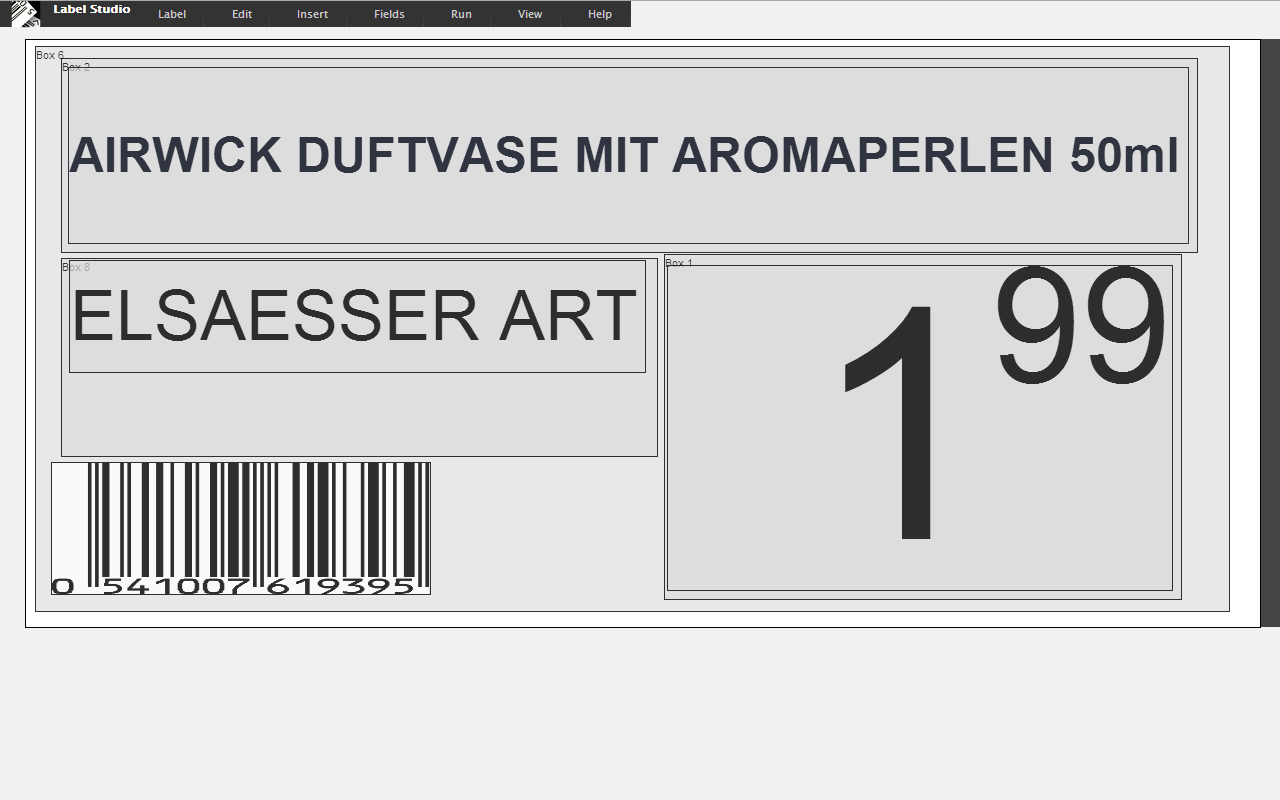
Label Studio
Design layouts in the browser, preview the result on screen and print it immediately — no software to distribute when a new layout is released.
40+ years
of barcode experience since 1985
No client install
everything runs in the browser
16 symbologies
linear, 2D, postal and GS1 barcodes
Cloud · On premises
Windows, Linux, macOS, Raspberry Pi
Complete core functionality in every edition
The same portable engine powers the cloud service, your own server and embedded devices — web user interface, graphical Label Studio, job queue, rich formatting, PDF generation and a web service interface.
Web user interface
Nothing to install on the client — operators, designers and admins just use a browser.
Graphical Label Studio
Design layouts with text, barcodes, images and dynamic fields in a web based editor.
Job queue
Collect, inspect, sort, reprint and delete print jobs per user or group.
Rich label formatting
Fonts, barcodes, images, backgrounds, positioning aids and computed fields.
PDF generation
Device independent PDF output that prints on any bitmap capable printer.
Web service interface
Submit jobs and manage resources from ERP, MES, SCADA or web applications.
Portable base package
The same portable engine scales from a Raspberry Pi to a corporate server.
Features
Everything you need to create, manage and print labels — without programming, without client software and without being locked into a single printer vendor.
Web service architecture
No client installation required
Web based Label Studio
Unique positioning aid
Printer independent PDF files
Uses all printers with standard OS drivers
XML, CSV, JSON and Excel sheet support
No programming required
Python API available
EAN-8, EAN-13, EAN-128, Code 39, Code 93, Code 128, Interleaved 2 of 5, Codabar, Code 11, MSI, QR, Datamatrix, GS1 Databar, GS1 Datamatrix, POSTNET and USPS 4-State supported
Unicode support (incl. bidirectional and Arabic)
Multi language support
OpenID Connect, OpenID and OAuth2 support
Supports modern browsers
Themeable whitelabel support
Embeddable into portals
Interfaces with Google Drive, Google Sheets and Google Cloud Print
Available in the public cloud or for Windows, Linux and Mac OS X
Barcode formats
All common linear, 2D and postal symbologies are available as label fields and can be computed from several data fields at print time.
Use cases
From a single label in the browser to fully integrated packaging lines and electronic shelf labels — LPSNG adapts to the way you work.
Shelf and product labelling
Professional product presentation and customer communication.
- Attractive design with full Unicode and colour support
- Optimal use of limited label space with the unique positioning aid
- Simple adaptation to changing market requirements
- Easy integration with other IT systems
- Can use the printers you already own
- Quick deployment and remote printing
Electronic shelf labels
One layout for paper, screen and e-ink — a true cross media solution.
- Device independent PDFs rasterised into bitmaps
- Multiple output media: on screen, printer and ESL
- Identical layout editor for all media types
- No vendor lock in: new label types integrate easily
- Each label can carry a computed ESL target address
- Virtual ESLs — the PDF can simply be displayed
Industrial and packaging lines
Label printing integrated into production, packaging and logistics.
- Industrial data provisioning for lot numbers, expiry dates and logistics data
- Online interface with printers and applicators
- Optional vision system interface for quality assurance
- Web based device control for operators
- SCADA parameters, scales and Excel lookup tables
- Pre-rendering keeps response times short
Order specific labelling
Your customers decide how their goods are labelled.
- Customer or product specific layouts
- Dynamic data fields from ERP and production systems
- Python scripts to adapt or combine data fields
- Background images for pre-printed labels
- Manual, automatic (web service or TCP) or hybrid requests
- Batch import from Excel, CSV, JSON or XML
LPSNG Player
The complete print engine as a standalone command line tool.
- Create label descriptions with LPSNG Cloud
- Pack them with fonts, bitmaps and sublabels
- Download a single file and call the player from the Windows command line
- Output as PDF, PNG, JSON with PNGs, Windows printer or ESL
- Simple integration and simple distribution
Embedded edition
Full label design and rendering on hardware as small as a Raspberry Pi.
- Single board computer with a complete LPSNG installation on SD card
- Web interface to control the device, including the label editor
- Serial or Ethernet interface to your printer
- Your printer just needs to print bitmaps
- Updates by simply replacing the SD card
- WLAN support is just a cheap USB stick away
Cloud solution
Use the public cloud service and forget about installation and maintenance.
- No installation or maintenance required
- Multi user with OpenID Connect and OAuth2
- Content distribution network and aggressive caching
- Background processors for rendering
- Integration with Google Drive, Sheets and Cloud Print
- Scalable — pay only what you really need
White label solution
Offer the complete user experience under your own brand.
- Fully tailored user experience
- Custom logos and theming
- CSS style sheets and JINJA2 page layout
- For printer manufacturers, paper manufacturers and system integrators
- Software maintenance done by RSJ
Built for teams and corporate deployments
More than 40 years of barcode experience went into the features that support centralised and decentralised enterprise deployments.
Multi user, roles and groups
- Users own designs and associated resources, print jobs and printers
- Print jobs can be addressed to specific users or groups
- Roles limit access: Admin, Designer, User or Device
- Multi region use, even on the same server: client time zone and browser language
Job queues
- Jobs are printed automatically or queued in a user or group specific queue
- View jobs on screen before printing
- Assign jobs to a printer by drag and drop
- Reprint, sort and delete jobs
Resource sharing
- Share resources as plain URLs via e-mail or the web
- Package resources with all dependencies such as fonts, bitmaps and test data
- Import packaged resources on other systems
Single sign on
- OpenID Connect, the modern web standard
- The integrated LPSNG user database
- Authentication via Microsoft Windows
Integrated wiki and configuration
- Project specific documentation distributed to your users with Markdown, links and graphics
- JSON configuration files parsed at server start
- Configurations extend a base configuration, so software upgrades never require configuration changes
Scripting and integration
- Python scripts can modify any field before it is printed
- The installer can distribute configuration files, user accounts, resources and the project wiki
- Web service interface authenticated with OAuth2
Backup and scaling
- Back up all data to a single file without stopping the server
- Restore the backup on a different server instance
- Multi device support through device independent output formats
- Multi processor rendering when licensed for it
Each user is assigned a role and can be a member of one or more groups, so you can associate LPSNG with real people while still routing print jobs to functional users.
Deploy it your way
Cloud, private server, production line or embedded in a device: it is the same modular system with the same label descriptions.
Public cloud
Use the cloud based service right on the web. No installation, no maintenance and no update rollouts — multi user, OpenID Connect and OAuth2 included.
Open Label StudioYour own servers
Deploy on premises for Windows, Linux or macOS. The portable base package keeps cloud and inhouse deployments technically identical.
Enterprise featuresProduction and packaging lines
Connect LPSNG directly with your packaging line: SCADA parameters, scales, applicators, vision systems and Excel lookup tables.
Packaging line detailsEmbedded into devices
Integrate the Embedded Edition directly into your printer or appliance — a complete Linux based installation on a single board computer.
Embedded editionEditions and pricing
Start with the free cloud test, subscribe monthly or yearly, or run LPSNG on your own hardware with a one time license.
Free test
Cloud · 15 day test
Free
for 15 days
- Public designs
- Neutral labels, powered by lpsng.rsj.de
- Community support
- Complete core functionality
On premises demo
Locally installed · single user
Free
for 30 days
- Public designs
- Neutral labels, powered by lpsng.rsj.de
- Community support
- Full local installation
On premises single user
Locally installed · single user
$ 399.00
one time fee
- Private designs
- Neutral labels, your own branding
- Priority e-mail support
- Runs on Windows, Linux or macOS
On premises multi user
Locally installed · multi user
Contact us
project specific licensing
- Multi user, roles and user groups
- Connect external systems
- Priority e-mail and phone support
- Embedded, packaging line and ESL deployments
Every edition shares the same core functionality: web user interface, graphical Label Studio, job queue, rich formatting, PDF generation, web service interface and the portable base package. Prices and conditions as published on lpsng.rsj.de/plans.
Open interfaces, no lock in
LPSNG connects to the systems you already run — and produces device independent output that works with almost any printing technology.
Web service interface
Submit print jobs, list resources for a user, create design templates from data, retrieve user authentication information and integrate vision systems. Authenticated with OAuth2.
Your data formats
Print job data in XML, JSON, Excel (XLS and XLSX) or CSV. Excel lookup tables can even be viewed and modified directly inside LPSNG.
Google integration
Google Drive for resources, the Google Sheets add-on for spreadsheet driven labelling and Google Cloud Print for output.
Identity and access
OpenID Connect, OpenID and OAuth2, the integrated user database or authentication via Microsoft Windows.
Scripting and APIs
Python field scripts modify any value before printing. Field Script API, Python API and the industrial device API are documented and open.
Embedding and theming
Embed LPSNG into your own portal and theme the whole user experience with CSS and JINJA2 templates for a whitelabel solution.
Runs where you need it
Talk to us about your labelling project
Tell us about your printers, your data sources and your process — we will show you how LPSNG fits in.
RSJ Software GmbH
Holzstrasse 4
82120 Germering
Germany
Phone +49 89 89 41 42-0
Fax +49 89 89 41 42-80
Product information
Do it yourself first
Create a label in the browser within minutes — the free cloud test needs no installation and no credit card.